
How to Write an AI Presenter Product Video: Better Hooks, Real Proof and Useful Prompts
Write a 30-second product video around one problem, a visible demonstration and a clear next step. Includes hook variations and a Sentarys presenter workflow.
A presenter gives the viewer someone to follow. The product demonstration gives them a reason to believe the message. A useful thirty-second video joins those jobs: name a recognizable problem, show what changes and make the next step clear.
Sentarys gives you a studio for presenter videos, product footage, captions and editing. You can write a focused script before opening the creation form, then review the finished delivery and the evidence it points to.
Choose one moment in the customer's day
“Manage your productivity” is difficult to demonstrate. “You leave a meeting with three tasks and cannot remember who owns the third” gives you an opening scene. For a video editor, it might be the folder of recordings a creator keeps meaning to cut. For an ecommerce product, it might be one specific part of the routine the product changes.
Write the moment as a sentence someone could say aloud. If your hook needs a list of features to explain the problem, narrow it. Save the feature list for the product page where the viewer has already decided to look closer.
Fit the script to a visible demonstration
| Approximate timing | Script job | What to show |
|---|---|---|
| 0 to 4 seconds | Name the frustrating moment | The folder, screen or everyday situation |
| 4 to 12 seconds | Explain the change | The actual product step |
| 12 to 24 seconds | Show the result | A real output or before-and-after |
| 24 to 30 seconds | Give one next step | The place to try or learn more |
Time a real read, since an avatar's delivery and your pauses can change these boundaries. Keep the line about the result near the result itself. A shot of someone smiling cannot prove that a product organized their work.
A reusable script prompt
Write a roughly 30-second presenter script for a video editor aimed at solo podcast creators. Problem: they keep postponing the job of finding complete clips in a long recording. Demonstration: importing their recording, reviewing a selected moment and correcting a caption. Use a conversational hook, one concrete benefit, a visible proof beat and one invitation to try the tool. Use only these supplied facts. Do not invent time savings, customer quotes, revenue, discounts or guaranteed results. Return only the spoken script, around 60 to 75 words.
That prompt helps a writing tool stay within your evidence. Paste the final spoken words into the presenter script input, and keep the planned demonstration as a separate editing note.
A practice script
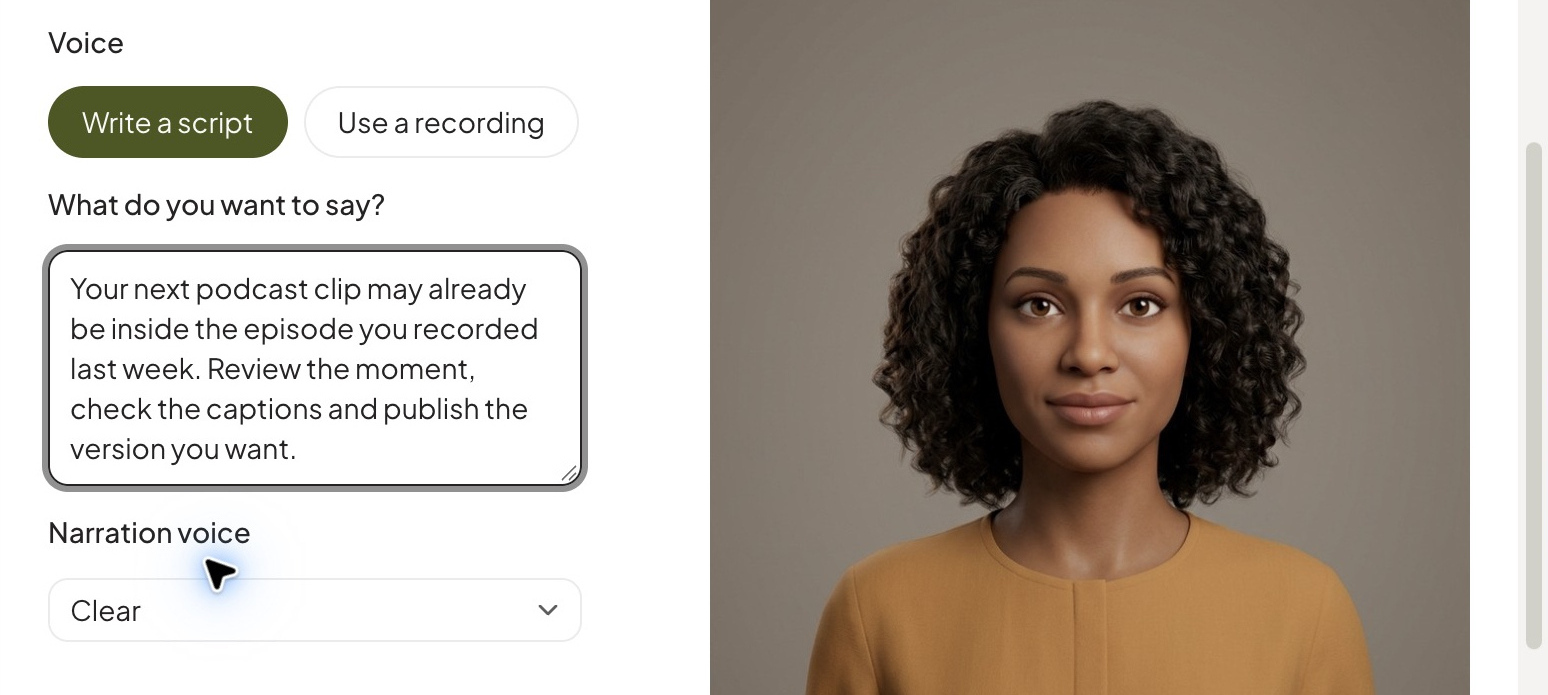
Your next podcast clip may already be inside the episode you recorded last week. Bring the recording into Sentarys, review the selected moment and keep the question with its answer. Then check the captions, adjust the edit and export the version you want to post. Here is the recording, here is the moment and here is the finished clip. Try it with your own episode.
The last three sentences invite an actual demonstration. Record the screen or show a finished example at that point instead of leaving the presenter on screen through every claim.
Write three hooks, keep the rest stable
- Situation: Your best clip is still sitting inside last week's episode.
- Question: Which answer in your podcast deserves its own Short?
- Demonstration: Here is how this full answer became one vertical clip.
Use the same body and ending to compare the openings. A new hook plus a new offer plus new footage makes it harder to learn which change helped. Review attention at the opening alongside whether people take the intended next step.
Variation prompt: Give me three opening lines for this script: one recognizable situation, one audience question and one demonstration-led opening. Keep each under twelve words. Preserve the product facts and the offer exactly. Avoid manufactured urgency. Return only the three lines.

Build and review it in Sentarys
- Open Create → Idea to Video → Presenter and choose Write a script or Use a recording to match your material.
- Select your presenter and check the words before generation. Supply a recording when your own delivery is part of the idea.
- Review the video at normal speed. Listen for brand-name pronunciation and pauses that split a sentence in the wrong place.
- Use your product footage to illustrate the demonstration. Finish the assembled video and captions in the editor.
- Watch on a phone, then export the version with one clear next step.
Make proof easy to inspect
Use your own screenshots, outputs and genuine customer material when you have permission. Present a scripted AI spokesperson as a spokesperson. Claims such as “I bought this” or “my results doubled” need a real basis; writing them into a presenter script cannot supply it.
The FTC's endorsement guidance explains why endorsements and material connections matter. Creatively, honest proof also gives you stronger images: the screen changed, the task finished, the viewer can see the result.
Continue with our hook guide, caption workflow and video translation workflow. Sentarys keeps the next version of your product video in the same studio.
Sentarys Pro is $10/month with 30,000 credits shared across AI workflows. Check the estimate for your chosen video before creating it. Start with 6,000 free credits and keep developing your channel in the same studio.
Ready to try Sentarys?
Paste a link or upload a video and get finished clips with captions. 6,000 free credits on signup, no credit card required.
Get Started FreeRelated Articles
Hook Formulas for the First 3 Seconds of a Short, With Examples by Genre
Five hook formulas that stop the scroll: cold open, on-screen text, question, stakes and pattern interrupt, with examples for podcasts, streams, dark channels, dorama and debates.
Anatomy of a Viral Podcast Clip: Why a 67-Second Story Works
A beat-by-beat look at a short podcast clip that holds viewers to the end, and the editing decisions you can copy.
Best Editing Software for Vlogging: Honest Picks by Vlogger Type
DaVinci Resolve, CapCut, Premiere Pro, Final Cut Pro, iMovie, Descript and Sentarys compared for vloggers, with the right pick for how you shoot and publish.