How to Edit a YouTube Video with AI: From Raw Files to a Finished Upload
A step-by-step workflow for editing your own long YouTube video with AI: organizing files, the story brief, chapters, review, captions, music, export and Shorts.
Editing a YouTube video with AI works best when you treat the AI as the editor who makes the first cut and yourself as the director who approves it. This tutorial walks through the full workflow in Sentarys, from a folder of raw files to a finished upload with chapters, captions, music and Shorts. The general advice applies whatever tool you use.
Before you upload: organize the footage
Ten minutes of preparation saves an hour of fixes later.
- Keep the originals. Copy files straight from the phone or camera card. Messaging apps and some cloud shares compress video.
- Group by day or place. Folders such as "day-1-arrival" and "day-2-market" help you check the order later.
- Remove obvious junk. Pocket recordings, accidental clips and exact duplicates only slow the review.
- Keep both kinds of shots. Talking-to-camera clips carry the story; wide shots and details explain where you are.
- Check the format. iPhone footage often uses HEVC. If another app cannot open a file, our free HEVC to MP4 converter makes a compatible copy of smaller files, but bring the originals to the editor when you can.
Step 1: Upload everything to one project
Open the AI vlog editor and add all the files for one video. A project accepts up to 300 files and 12 hours of footage, and uploads resume if the connection drops. Upload everything you might use. The AI is better at choosing from a full set than you are at predicting what it will need.
Step 2: Write a story brief
A brief tells the editor what the video is about. Three or four sentences are enough:
- What the video is: "A first trip to Japan with my sister, for viewers planning their own."
- The shape: "Open with getting lost in Shinjuku, build up to the day at the shrine, end with the night walk."
- Must-keep moments: "Keep the conversation at the sushi counter and the train announcement."
- Tone: "Relaxed and funny, without dramatic music."
Avoid asking for a fixed duration when the footage does not support it. Let the material decide how long the story should be.
Step 3: Let the AI build the chapters
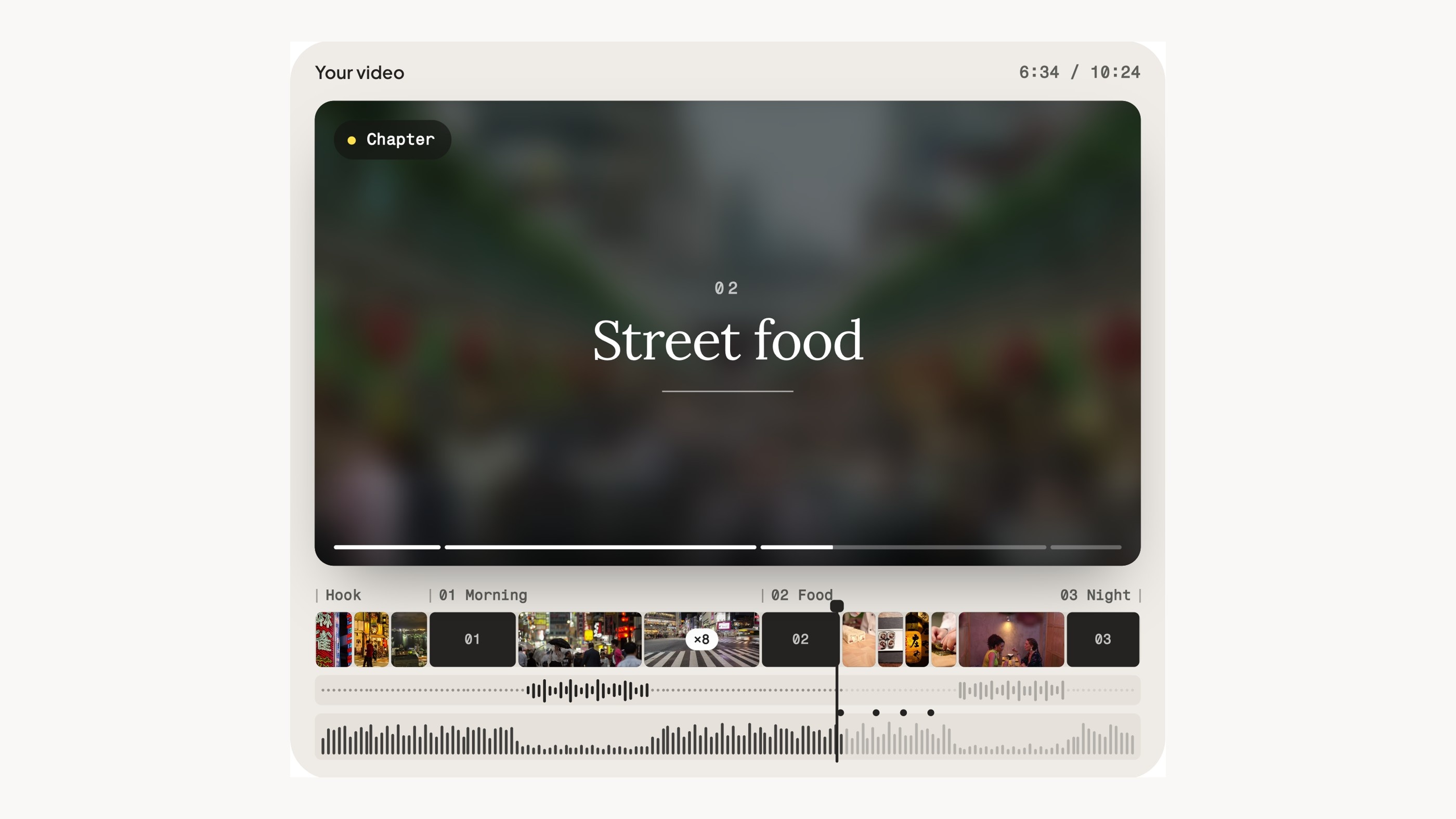
Sentarys logs every moment, keeps what you say to the camera as whole sentences and builds chapters in the order things happened. The edit opens with a hook, covers gaps with b-roll from your other files and uses timelapse where nothing is said. It adds title cards with place names, a music bed per chapter and captions. A few files take minutes; a week of trip footage can take one to two hours. You get an email when the video is ready.
Step 4: Review the first cut in order
Watch the whole first chapter without stopping, then go back with this checklist:
- Story: could a stranger follow where you are and why each scene matters?
- Speech: does every explanation keep its beginning and its conclusion?
- B-roll: does each shot match what you are describing? A shot from another day can tell the wrong story.
- Repetition: are two similar views back to back? Keep the better one.
- Opening: do the first seconds make someone want to see the rest?
Fix one kind of problem at a time: story order first, then sentence boundaries, then shots, then sound. In the chapter editor you can replace a scene, trim a stretch, change the music or record your own voiceover.
Step 5: Check the captions
Captions are part of the edit. Read them while listening, with extra attention to place names, local dishes, people's names and numbers. If you edited a video somewhere else and only need subtitles, auto captions adds word-by-word captions to the whole video and gives you SRT and VTT files.
Step 6: Balance music and voice
Each chapter gets its own music bed, which dips whenever someone speaks. Listen on a phone speaker and on headphones. If a word becomes hard to understand, the music is too loud for that moment. Keep natural sound, such as a ferry horn or street noise, where it adds atmosphere.
Step 7: Export and add YouTube chapters
Export in 1080p and watch the complete file once more. When you upload, you can add chapters by listing timestamps in the description. YouTube's chapter rules say the first timestamp must be 00:00, you need at least three timestamps in ascending order, and each chapter must be at least 10 seconds long. Your Sentarys chapters give you natural chapter points to copy.
Step 8: Cut Shorts from the same project
Choose moments that stand on their own: a surprise, a funny exchange, a quick tip. Open with the payoff or the question, keep enough context to understand it and point viewers to the full video.
Editing advice that works with any tool
- Earn the first 30 seconds. YouTube's retention report shows how many viewers are still watching after the first 30 seconds. Show what the video promises early.
- Cut repetition before atmosphere. Viewers forgive a quiet moment more easily than the same point made twice.
- Let moments finish. Cut once a reaction has fully landed.
- Check with sound off. If the story still makes sense on mute, your shots and captions are doing their job.
- Read the retention graph after publishing. Dips show where people skip; use them to plan the next edit. Our guide on YouTube video length explains how.
What it costs
Long editing uses 80 credits per minute of footage the AI reads, so 60 minutes of footage uses 4,800 credits, even if the final video is 12 minutes. A 2,000-credit minimum applies. Sentarys Pro is $10/month with 30,000 shared credits, about 6 hours of footage if the whole balance goes to long edits. Each workflow shows its estimate before you start, and a new account gets the first chapter edited free with a small watermark. See pricing.
FAQ
Can AI edit my YouTube videos from raw footage?
Yes. Sentarys takes up to 300 files and 12 hours of footage per project, finds the story, builds chapters and returns an edited video you can adjust in the chapter editor.
How long does an AI edit take?
It depends on how much you upload. A few files take minutes, and a week of trip footage can take one to two hours. You get an email when it is ready.
Will the AI cut me off mid-sentence?
Sentarys keeps talking moments as whole sentences. Still listen to the start and end of each explanation during review. For travel-specific tips, read how to edit a travel vlog with AI.
Ready to try Sentarys?
Paste a link or upload a video and get finished clips with captions. 6,000 free credits on signup, no credit card required.
Get Started FreeRelated Articles
Descript Alternative for YouTubers Who Edit Visual Long Videos
Descript is strong for transcript editing and podcasts. If your YouTube videos are built from locations, b-roll and many raw clips, here is when Sentarys fits better.
How to Turn Phone Clips into a Travel Vlog with AI
Organize your phone footage, give Sentarys a story brief, review the long edit and turn the finished travel vlog into Shorts.
Best Editing Software for Vlogging: Honest Picks by Vlogger Type
DaVinci Resolve, CapCut, Premiere Pro, Final Cut Pro, iMovie, Descript and Sentarys compared for vloggers, with the right pick for how you shoot and publish.